
 Free for Windows 10 & 11
TechCheck
An easy to understand diagnostic for your Windows PC.
Find out why your computer is slow, why the internet keeps dropping, or where that strange browser came from. Then send a one-click report to whoever helps you with tech.
Windows may show a "Windows protected your PC" message the first time. Here's why, and what to click.
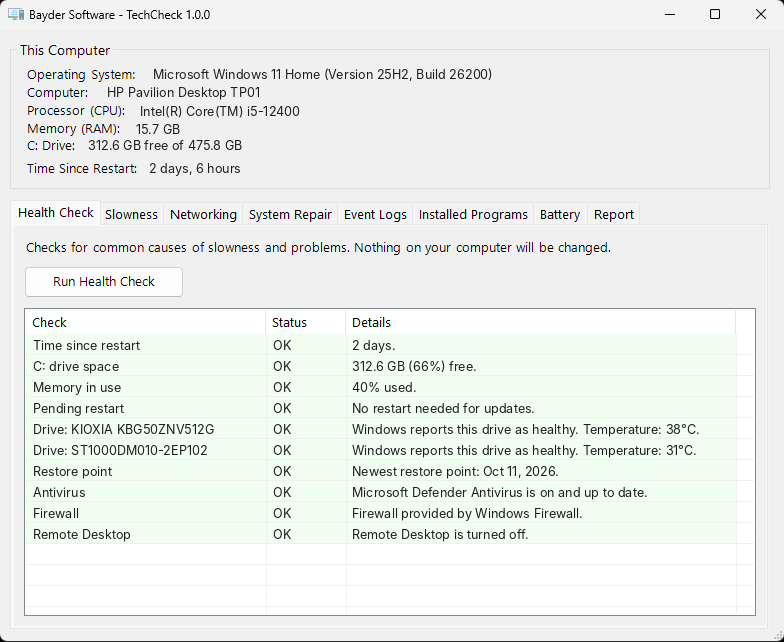
The checks a tech person would run, in one window
Every result is explained in everyday language, with what to do next.
Quick health check
Disk space, time since restart, restore points, and more, checked the moment it opens.
Why is it slow?
See which programs are using your memory and processor, how many start with Windows, and clear out temporary files.
Internet troubleshooting
Tests your router, then the internet, then website lookups, so you know where the connection breaks. Includes the common fixes.
Windows repair
Runs Windows' built-in repair tools for you, and creates a restore point first so changes can be undone.
Crashes, translated
Reviews the last week of Windows logs for blue screens, sudden shutdowns, and signs of a failing drive, and skips the harmless noise.
Unwanted programs flagged
Spots look-alike browsers and other software that sneaks in from websites. It explains each one and never deletes anything on its own.
Send a report, not a description
"It's acting weird" doesn't tell you much. One click saves everything TechCheck found to a single file anyone can email. You see the computer's details, the warnings, and recent crashes before you ever pick up the phone.
How it works
Download
A single TechCheck.exe will download, likely to your downloads folder. There is nothing to install, and no account to create.
Open TechCheck.exe and click Yes
Windows asks for permission because repair tools need administrator access. The health check starts right away.
Fix it or send it
Follow the suggestions yourself, or export a report for someone who can help.
Before you download
Windows says "Windows protected your PC." Is it safe?
Windows shows this for new programs from small developers that it hasn't seen many times yet. Click More info, then Run anyway. Only do this for files downloaded from baydersoftware.com.
Will it change anything on my computer?
Not unless you click a button that says so. Anything that makes changes asks first, explains what it does, and creates a restore point before repairs.
Does it collect my information?
No. Results stay on your computer. Reports are only shared if you send them yourself. When it opens, TechCheck checks this website for a newer version, which shares your IP address the same way visiting any website does.
How do I get updates?
TechCheck shows a link in its window when a new version is available. It never downloads or installs anything by itself.
Is it really free?
Yes. No trial, no ads, no upsell.
If you would like to donate to help support Bayder Software:
Donate Here